
Hole19 Golf GPS & Range Finder
Hole19Sports
4.71.12K Reviews
- Version
- 5.57.0
- Installs
- 5.00M
- Age Rating
- Everyone
Screenshots
Our Review of Hole19 Golf GPS & Range Finder
 Analysis by Appyee
I like having a simple plan before I reach the first tee, and a golf app is most useful when it helps with decisions without taking over the round. Hole19 Golf GPS & Range Finder is a sports app from Hole19 that brings course distances, scoring and performance tracking together on a phone. Its focus is practical: check a yardage, record a hole, and look back at how the round went. I see the appeal for golfers who want more than a paper scorecard but do not want to build their whole game around complicated equipment.
Where it fits in a golfer’s routine
The basic choice is whether you want a phone-based companion or a dedicated GPS watch or rangefinder. Hole19 is convenient when your phone is already with you and you want distances and scoring in one place. A physical rangefinder can be quicker for someone who prefers looking through an eyepiece and pressing a button, while a watch can keep the phone tucked away. Those alternatives are not automatically better: they may require separate equipment, and they do not necessarily put round notes and scoring in the same familiar screen. The useful question is which device you will actually check between shots.
For a casual weekend player, the app can replace a small stack of disconnected habits: estimating yardages, writing a score on a card, and trying to remember later which holes caused trouble. For a golfer who already owns a reliable rangefinder and keeps detailed notes elsewhere, the extra app may feel redundant. I would treat it as an accessible all-in-one option rather than a reason to abandon equipment or routines that already work.
Hole19 is free to download, with in-app purchases ranging from $2.99 to $99.99 per item. That gives a new user a low-friction way to try its basic role before deciding whether any paid option is worth considering. I would first identify the feature I actually need, then check whether it is available in the free experience or requires a purchase; buying on impulse is unlikely to improve a score by itself.
How to get more useful information from a round
The scorecard becomes more valuable when I use it consistently rather than only on a memorable day. A practical workflow is to enter scores as I go, then review the round while the details are still fresh. If a hole went badly, a short note about the decision or situation can be more useful than simply seeing the number later. This turns a record of results into a prompt for a specific adjustment next time.
There is a trade-off, though: entering information on every hole takes attention. I would keep the routine light, especially when playing with others. Record the essentials first and avoid tapping through screens while someone is ready to hit. If detailed tracking starts slowing the group or distracting you from your shots, a paper card and a brief post-round review may be the better fit.
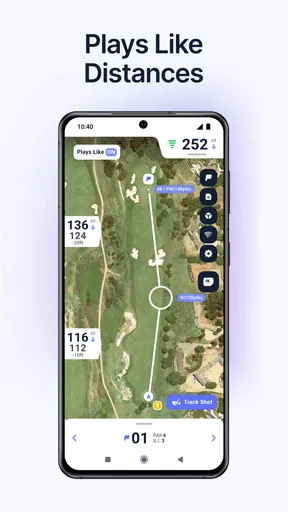
Distances are most helpful when used as part of a decision, not as an instruction. A yardage to the green or a hazard can help me compare a conservative lay-up with a more ambitious shot, but it cannot decide which club suits my lie, wind, confidence or current swing. I would use the displayed distance as a planning reference, then make the final call based on what is happening on the course. That distinction matters most for golfers who are tempted to treat any GPS reading as a guarantee.
A realistic example is a player arriving at an unfamiliar course with only a few minutes before a round. They can check that the course is available, use the app for a quick sense of the hole and its targets, and keep the scorecard in the same tool as play continues. Afterward, reviewing the round can reveal whether the biggest issue was missed fairways, trouble around greens, or simply a couple of costly holes. The benefit is not instant improvement; it is having a clearer account of what happened than memory alone provides.
Who will appreciate it—and who may not
I think the strongest audience is the golfer who plays often enough to care about patterns but does not want a specialist setup. Beginners can use a digital scorecard and course distances to feel less uncertain about what lies ahead, while more experienced players may value having a round history and a convenient way to review performance. The app is also appealing if friends enjoy comparing rounds or sharing golf activity, though social features are a bonus rather than a reason everyone needs to use it.
It is less compelling for someone who wants a completely screen-free walk, has no interest in recording scores, or already relies on a dedicated device that covers the same needs. It may also be a poor match for a player who finds phone checks distracting. A useful test is to ask whether you will open it for a specific purpose—distance, scorekeeping or review—rather than expecting an app to make the round better simply by being installed.
Golf is played outdoors, so phone battery and screen visibility are sensible practical considerations for any phone-based tool. I would start a round with enough charge, avoid leaving unrelated apps running if battery life is a concern, and make sure I can read the screen comfortably in the conditions. These are everyday trade-offs of using a phone on the course, not reasons to assume the app will replace every purpose-built golf device.
What the current version means for regular users
The app has been available since January 28, 2015, and its current version is 5.36.0. That long-running presence suggests Hole19 has continued as a maintained product, but a version number alone does not tell me which specific features changed or whether a particular golfer will notice a difference. Existing users should judge the current experience by whether it still fits their routine, rather than assuming that a higher version number necessarily changes how they play.
For someone returning after a break, the sensible approach is to open the app before a round and check the course, scoring flow and settings they rely on. That small check can prevent fumbling at the first tee. I would also avoid making a major change to my on-course routine in the middle of a competitive or important round; try unfamiliar screens during a relaxed practice outing first.
Hole19 has an average rating of 4.4 from around 30,000 ratings, with about 1,100 written reviews and over 5 million installs. Those figures show it has found a substantial audience, but popularity cannot tell me whether its workflow suits an individual. I would use them as context, then focus on the practical questions: can I find my course, do I like recording a score on my phone, and does checking yardage help me make calmer choices?
What to check before relying on it
Course coverage is one of the first things I would verify for my own plans. A broad golf audience does not guarantee that every course I visit will be represented exactly as I expect, so checking the course in advance is more sensible than discovering a mismatch at the tee. This matters especially when travelling or arranging a round somewhere unfamiliar. If the course information does not suit your needs, a dedicated rangefinder or another established method may be a safer backup.
I would also decide how much data I want to enter. The more consistently a golfer records scores and performance, the more useful the history can become; sporadic entries make comparisons harder to interpret. On the other hand, there is no need to track every detail to get value. Starting with scorekeeping and distances, then adding more only if it genuinely helps, keeps the app from turning a relaxing round into paperwork.
The app is rated for Everyone and has a minimum operating-system requirement of version 10. Before installing, I would check that the device meets that requirement and that the phone is comfortable to carry during a round. The developer is Hole19, and the free starting point makes a trial reasonable for golfers curious about phone-based course support. Paid items are worth considering only after you know which part of the experience you want to extend.
What should a golfer watch for over time? I would pay attention to whether the course information remains useful for the places I play, whether scoring is quick enough to preserve the pace of the round, and whether post-round stats lead to decisions I can actually act on. Those are more meaningful measures than feature count. If I find myself checking the screen constantly or collecting numbers without changing practice, I would scale back to the parts that serve a clear purpose.
So, I recently got my hands on the Hole19 Golf GPS & Range Finder app, and let me tell you, it’s been quite the game-changer for my golf sessions. If you’re anything like me and you’ve been looking to up your golf game without breaking the bank, you’ll want to stick around for this one.
Getting Started on the Green
First off, downloading and setting up the Hole19 Golf GPS & Range Finder was a breeze. Available on both Android and iOS, it’s just a quick search away on your app store. Once you’ve got it on your phone, the registration process is pretty straightforward. You can sign up using your email, or if you’re in a hurry, just link it up with your Facebook account.
As someone who’s not a tech wizard, I appreciated how intuitive the interface is. The app kicks things off by letting you customize your profile. You can add your handicap, preferred courses, and even connect with friends. It’s like having a little golf community right in your pocket.
The Core Features
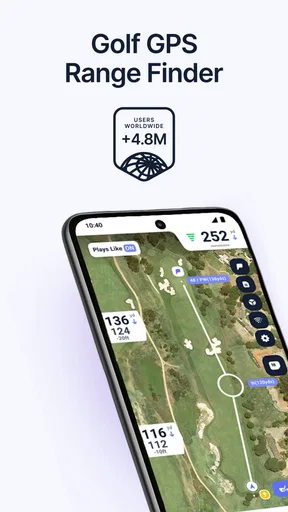
Now, let’s dive into what really makes this app stand out. The GPS functionality is top-notch. With over 43,000 courses worldwide, it’s like having a personal caddy that knows the ins and outs of almost every course you can think of. When I hit the course, I just open up the app, select my location, and boom – I’m ready to play.
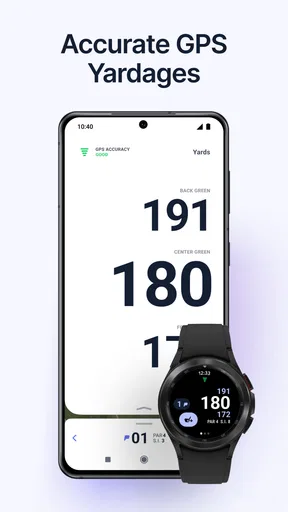
The range finder feature is a lifesaver. I love how it provides accurate distances to the front, back, and center of the green. It even gives you distance to hazards, which is super helpful for planning those tricky shots. The interface is clean and easy to navigate, so you’re not fumbling with your phone when you should be focusing on your swing.
Scorecard and Statistics
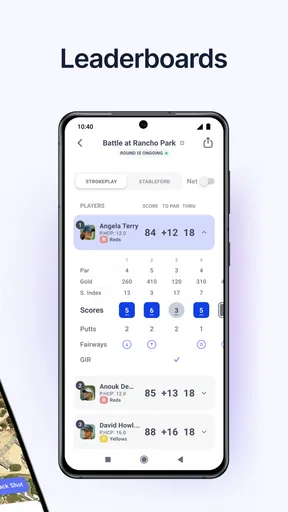
The digital scorecard feature is another gem. Gone are the days of scribbling scores on a piece of paper. Now, I can keep track of everything directly in the app. It’s satisfying to see the stats after a round, and it helps me pinpoint areas where I can improve.
What’s really cool is the statistical breakdown. You can analyze your performance by looking at stats like driving distance, accuracy, and greens in regulation. It’s like having a personal coach giving you feedback on every aspect of your game.
Community and Social Features
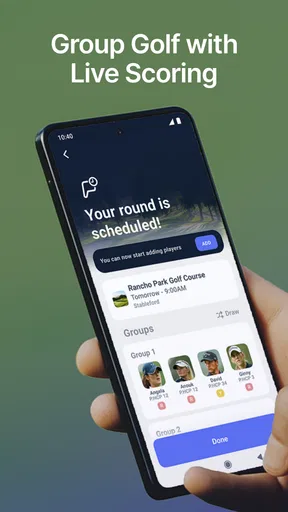
One of the things I didn’t expect to enjoy so much was the community aspect. You can connect with other golfers, share your rounds, and even compete in challenges. It’s a great way to stay motivated and learn from other players. There’s also a neat feature where you can follow your favorite courses and get updates on course conditions and events.
I found myself spending quite a bit of time on the social feed, checking out what other golfers are up to. It’s like being part of a global golf club, and who doesn’t want that?
Final Thoughts
All in all, the app has definitely earned a permanent spot on my phone. It’s packed with features that genuinely enhance my golfing experience, and the community aspect is the cherry on top. Whether you’re a seasoned pro or just getting started, this app is a fantastic tool to have on your side.
So, next time you’re heading out for a round, make sure you’ve got Hole19 along for the ride. Trust me, your golf game will thank you.
Verdict
Strengths of Hole19 Golf GPS & Range Finder
- Accurate GPS tracking on courses.
- User-friendly interface design.
- Detailed statistics tracking.
- Works offline for remote courses.
- Free version offers many features.
Limitations of Hole19 Golf GPS & Range Finder
- Battery usage can be high.
- Premium features require subscription.
- Some courses need manual updates.
- Occasional GPS signal loss issues.
- Ads in the free version can be intrusive.
Similar Picks in This Category
View All
BeSoccer: Soccer Live Score
BeSoccer apps4.3

Cricbuzz - Live Cricket Scores
Cricbuzz.com3.7

NFL
NFL Enterprises LLC2.4

Da Fit
MO YOUNG LIMITED3.6

ESPN
Disney4.5

LiveScore: Live Sports Scores
LiveScore Limited4.5
Frequently Asked Questions
What features does Hole19 Golf GPS & Range Finder offer?
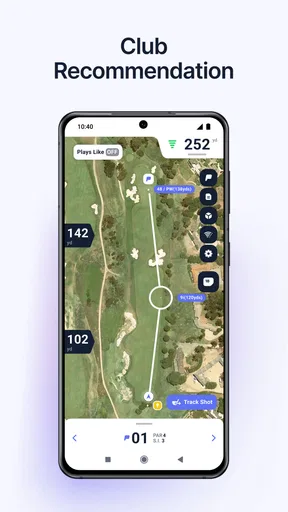
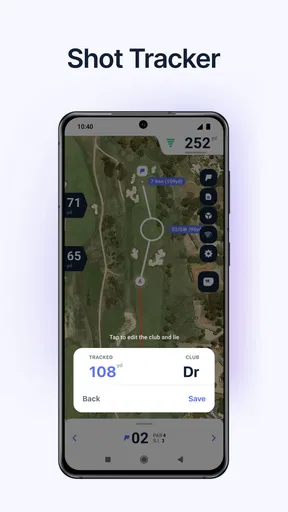
Hole19 Golf GPS & Range Finder provides accurate GPS distances on over 43,000 golf courses worldwide. It includes a digital scorecard, shot tracking, and a club recommendation feature to enhance your game. Additionally, the app offers advanced statistics and performance insights to help you understand and improve your gameplay.
Is Hole19 Golf GPS & Range Finder free to use?
Hole19 offers a free version with basic features such as GPS range finding and score tracking. However, for more advanced features like shot tracking and club recommendations, a premium subscription is available. The premium version also provides in-depth statistics and ad-free usage. Users can choose according to their needs.
How accurate is the GPS feature in Hole19?
Hole19's GPS feature is highly accurate, providing real-time distances to the front, middle, and back of the green. The app uses your device's GPS to ensure precision. It’s important to have a stable internet connection and enable location services for optimal performance. Users generally find it reliable for improving their course management.
Does Hole19 Golf GPS & Range Finder support offline use?
Yes, Hole19 supports offline use, allowing you to download course maps and use the GPS features without an internet connection. This is particularly useful for courses with limited connectivity. However, some features, like live scoring and updates, require an internet connection to function fully.
Is Hole19 compatible with smartwatches?
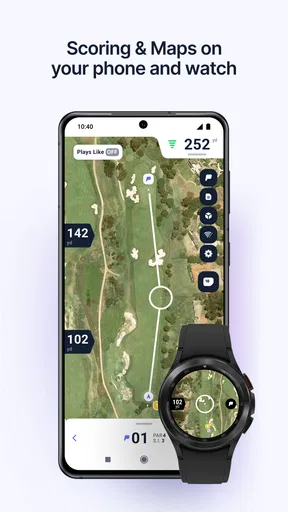
Hole19 is compatible with both Apple Watch and Android Wear, allowing golfers to access GPS distances and scoring directly from their wrists. This feature adds convenience, as players can receive important information without needing to pull out their phones, enhancing the overall golfing experience.
